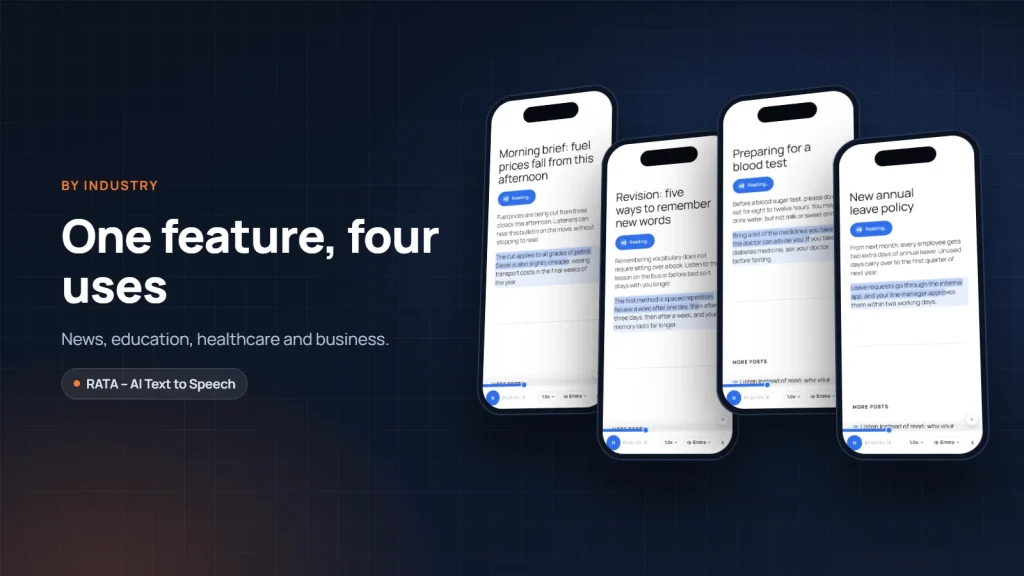
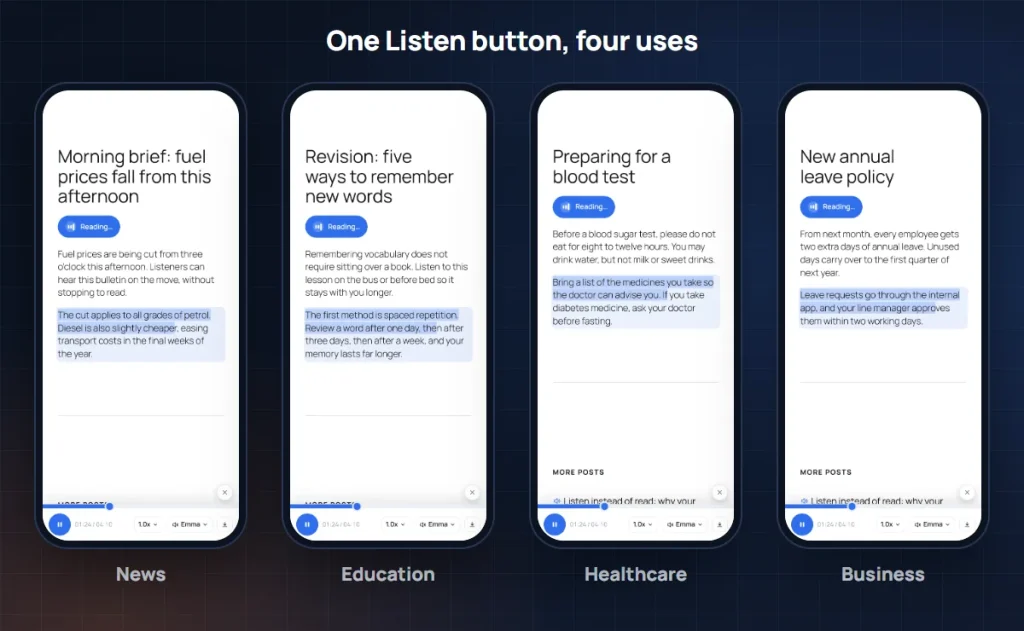
A Listen button looks the same on every website, but the way people use it varies widely. News readers want to hear the headlines while driving in the morning. Students want to revise when they cannot hold a book. Older patients want to hear their doctor’s advice again. Employees want to catch up on a new policy without reading a long document. This article closes the series on voices for websites with a practical question: how should your industry make use of a Listen button.
News: listening to the headlines on a busy morning
Many people now listen to news articles as a daily habit. Major newspapers all offer audio versions, and readers are increasingly used to hearing the day’s news instead of reading every article.
For a news site or an industry magazine, a Listen button helps readers take in more articles in the same amount of time. They finish one article and move on to the next, while their hands are on the steering wheel or making coffee. Time on site goes up naturally.
Speed matters most for news: a newly published article needs audio straight away. The paid version of RATA creates the audio automatically when the article is published, so breaking news has a voice at the same moment as the text. When the article is updated with new developments, only the new paragraphs are read again.
Education: learning by ear, revising on the move
Not everyone learns best with their eyes. Many people take things in faster by ear, and almost everyone has idle moments in the day that could be used to review what they have learned.
For schools, training centres and knowledge blogs, a Listen button turns lessons, summaries and guides into listening material. Learners choose their own speed: slower for new material, faster for revision. With the paid version of RATA, the sentence being read is highlighted on the page, so learners can listen and follow the text at the same time, a way of learning many people like.
Educational content often contains technical terms and proper names. The pronunciation dictionary makes sure those words are read correctly in every article, so learners do not hear them wrong and remember them wrong.
Healthcare: clear instructions for older patients
People looking for health information are often older, or worried about a relative. They need clear information that is easy to take in, and many of them find small text on a phone hard to read.
For clinics, hospitals and laboratories, a Listen button is a way of caring for patients before they even arrive. Preparation before a test, advice after treatment, an explanation of a common condition can all be heard in a natural, calm voice with correct pronunciation.
Medical terms and drug names are where voices are most likely to slip. Add them to the pronunciation dictionary before creating the audio. A clear, accurate voice feels professional and trustworthy, exactly what patients need from a healthcare provider.
Business: policies, guides and brand stories
Businesses have two kinds of readers: customers and employees. For customers, a Listen button on expert articles and brand stories helps content travel further, especially when it is read in your own brand voice. For employees, guides, policies and internal procedures are often long and dry; listening helps them get the essentials faster, even while travelling between sites or branches.
Not every page needs a Listen button. RATA lets you choose exactly which post types, categories or pages show the player, and turn it off for individual articles. You could enable it for knowledge and guide categories while leaving product and contact pages as clean as before. See Player display: position, post types, categories.
Retail and travel: telling stories that sell
For online shops and travel businesses, articles are not only there to inform but to inspire. A guide to a destination, the story behind a product, advice on choosing something to buy, all of these sound better when they are told.
A customer considering a trip can listen to your travel guide on the way to work. A shopper can listen to a product comparison while their hands are busy. When your content follows them into those moments, your brand stays on their mind longer.
For websites with international visitors, voices in English and other languages help your content reach more people. The paid version of RATA supports multilingual websites, with its own voices and reading settings for each language, so each visitor hears a voice in their own language.
What every industry has in common
Whatever the industry, three things decide whether a Listen button gets used. First, a natural voice: correct pronunciation, real intonation and a familiar accent, like the voices of Vbee AIVoice that RATA uses. Second, getting your industry’s own words right, through the pronunciation dictionary. Third, a light experience: a small, easy player that does not bother people who prefer to read.
You can read the whole series from the start, beginning with Listen instead of read: why your website needs a Listen button in 2026.
Conclusion
Morning news on the go, revising on the bus, hearing a doctor’s advice again, catching up on a new policy during a break: every industry has a moment when a Listen button becomes genuinely useful. Think about your readers, where they are and what they are busy with when they visit your website, and put the Listen button where they need it. You can start with the free version of RATA, or see the plans on the product page.
Frequently asked questions
Question 1. Can I enable the Listen button for one category only?
Yes. You choose which post types, categories or pages show the player, and turn it off for individual articles when needed.
Question 2. Will the voice pronounce medical terms or drug names correctly?
Add those words to the RATA pronunciation dictionary once, and every article after that reads them correctly. See Pronunciation dictionary and sentences read instead of tables and images.
Question 3. A news site publishes many articles a day. How can audio keep up?
With the paid version of RATA, audio is created automatically as soon as an article is published. The queue retries on errors, and the log records each creation.
Question 4. What about a website in both Vietnamese and English?
The paid version of RATA supports multilingual websites, with its own voices and reading settings for each language.
Links to Vbee in this article carry RATA’s referral code; RATA may earn a commission at no extra cost to you. “Vbee” and “Vbee AIVoice” are trademarks of Vbee AITalk. RATA is independent software developed by Fox40.